
Showing posts with label Internet Tricks. Show all posts
Airtel Tricks
Docomo Tricks
Featured
GPRS Tricks
Hacking Softwares
Handler Apps
Idea Hacks
Internet Tricks
Mobile Tricks
Modded Apps
Proxy
Security
Symbian
Tutorials
Vodafone Hacks
How GPRS tricks works for Airtel, Idea and other networks? [COMPLETE TUTORIAL]
 If you have seen our previous posts in this blog, you may have wondered how this GPRS hacks. And may be thought, Are these network operators so foolish? Anyway, here I'm going to explain you clearly how the GPRS hacks works and how you can also HACK Them. Yes! Now you can also hack them according to your need after reading this tutorial. I guarantee that you also can become a hacker after reading this. Many users have requested me to explain how GPRS hacks works and I'm tired of explaining all these things to everyone. That's why I'm creating this post. Actually It is not at all an easy task. It have no much difficult too. Just some knowledge and patience is enough!. So stop wasting time to search in the web and comment on some stupid blogs and request them to say how to hack. Just read below and you can do it.
I don't know How extend you can understand this
. Anyway I will try my best to explain even the minute things as I can. Start reading below!
Make free calls worldwide via Internet on Phone or PC [UNLIMITED]

Opera Mini 7 hack for free Vodafone GPRS hack 2G 3G jar
 First on net! Hackingpalace presents presents new Opera mini 7 hacked for free GPRS in 3G and 3G. It was a long time since last vodafone hack was released. So, I was trying to find a new hack for Vodafone Internet. Vodafone is a leading mobile operator in India. It's main advantages are availability of wide coverage and good internet speed. With this hacked software, I got 25-40KBPS. Average site loading time was less than 1Second!. Read the instructions below to access Vodafone for free GPRS.
New UC Browser 8.6 hacked for Airtel free internet / 3G with resume downloading
New UC Browser 8.6 is hacked for free GPRS /3G internet for Airtel users. New UC Browser 8.6 comes with improved User interface and more support for touch screen mobiles. But they didn't improved speed and performance. New Uc 8.6 is more stable than 8.5. Downloading support and cloud storage are also good. Unlike my previous modded apps, this version can download files ofany format for free in Airtel. it also support resume in downloading.


Airtel Free 3G Gprs on PC with Vnap .Net Buster handler [Unlimited Internet] 2012 JULY

Note: balance must be below RS.30 otherwise your balance will be deducted
Speed: 10 to 40KBPS on 2G and 120-200KBPS on 3G [It may slightly vary according to your device
How to Increase Airtel Docomo Idea vodafone Aircel GPRS Speed

Here is the trick to increase your GPRS speed.
First, Go to Network Connections> Right Click your connection> Properties> Networking> Properties>
Select "Use the following DNS addresses" and enter any of the DNS below.
8.8.8.8
8.8.4.4
208.67.222.222
208.67.220.220
Give any one as Primary or Secondary DNS servers. Restart your PC to notice the changes.
Dont forget to comment!
Hack torrents to get high speed [disable seeding] upto 150%
Torrent is used by most people for downloading big files today . Torrent file with a lot of seeds and leechs can increase its speed, but it isn´t always easy. In this tutorial we will see tips and hacks in addition to the speed up your µTorrent.
How torrent works? It is only "upload" and "Download".You can more take(download) and less give(upload),or hack TCP Connections in XP , or add public trackers and etc.
Follow the steps below and speed up your µTorrent. Steps 1,2 and 5 are only for Windows XP
1.Open port through Windows Firewall. Go to Control Panel, then Windows Firewall , select tab Exceptions and click Add Port


Maximum Number of connected peers per torrent:upload speed * 1.3/8
Number of upload slots per torrent:1 + (upload speed / 6*8)
Use additional upload slots if upload speed <90%:Checked
Allow incoming Legacy Connections: Checked


7.This is very useful when a torrent stops near the end, also increase download speed. Copy and paste this list of public trackers into your torrent’s tracker list.
http://tracker2.istole.it:60500/announce
http://inferno.demonoid.com:3400/announce
http://vip.tracker.thepiratebay.org/announce
http://track.sextorrent.to:2710/announce
http://tracker.deluxebits.to:3552/announce
http://denis.stalker.h3q.com:6969/announce
http://tracker.thepiratebay.org/announce
http://tracker.torrentbox.com:2710/announce
http://tracker.hexagon.cc:2710/announce
http://tracker.torrent.to:2710/announce
http://axxo.sladinki007.net:6500/announce
http://220.162.244.175:53880/announce
http://tpb.tracker.prq.to/announce
http://open.tracker.thepiratebay.org/announce
http://eztv.sladinki007.net:60500/announce
http://tv.tracker.prq.to/announce
http://218.145.160.136:8080/announce
http://tracker.prq.to/announce
http://tracker.torrenty.org:6969/announce
http://tpb.tracker.thepiratebay.org/announce
http://t.ppnow.net:2710/announce
http://www.torrentvideos.com:6969/announce
http://tracker.bitebbs.com:6969/announce
http://www.torrent-downloads.to:2710/announce
http://eztv.sladinki007.eu:60500/announce
http://www.ipmart-forum.com:2710/announce
http://tracker.ydy.com:83/announce
http://bt1.the9.com:6969/announce
http://tracker.sladinki007.net:6500/announce
http://tracker.ydy.com:102/announce
http://tracker.paradise-tracker.com:12000/announce
http://moviesb4time.biz/announce.php
http://tracker.deadfrog.us:42426/announce
http://mpggalaxy.mine.nu:6969/announce
http://www.sumotracker.org/announce
Right click on weak torrent, select Properties


NOTE: Do not attempt this trick with private torrents, it’ll only get you banned from the tracker. .All work at your own risk
How torrent works? It is only "upload" and "Download".You can more take(download) and less give(upload),or hack TCP Connections in XP , or add public trackers and etc.
Follow the steps below and speed up your µTorrent. Steps 1,2 and 5 are only for Windows XP
1.Open port through Windows Firewall. Go to Control Panel, then Windows Firewall , select tab Exceptions and click Add Port
Chose port between 50000 – 65000, select TCP, write name like µTorrent and click OK
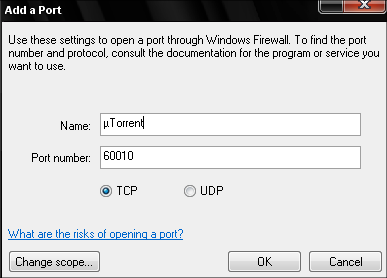
2. In this step we will change µTorrent Preferances, Connection. Open µTorrent and go to Options->Preferances or press Ctrl+P

In Preferences window chose Connection tab and add port, which is defined in step 1, in my case it´s 60010. Others parameters choose as shown below. Click Apply

3.In this step we´ll change maximun upload and download rate. First, you need to know your upload and download speed. If you don´t know, go to this site and test your speed. My speed test looks like this
Choose Bandwidth tab, calculate the optimal settings for your connection, maximun upload rate with this formula upload speed*0,8/8 and add that speed. Also calculate maximun download speed and add. Formula is download speed *0,95/8 . I have speed 4110/750 kB/s. I have added download rate 498 and upload rate 75.Other parameters set like this:
Global Maximum Number of Connections: 600Maximum Number of connected peers per torrent:upload speed * 1.3/8
Number of upload slots per torrent:1 + (upload speed / 6*8)
Use additional upload slots if upload speed <90%:Checked

4.Go to Options->Preferences->BitTorrent
Protocol encryption: Outgoing:EnabledAllow incoming Legacy Connections: Checked

5. Windows XP/SP2 has problem with TCP connections, they are limited to a maximum of 10. This isn´t good for your download speed. How to fix this? Just download patch and install. Set the limit between 50 and 100.Installation looks like this

When Windows File Protection click Cancel

6. Go to Options- > Preferences- > Advanced options -> net.max_halfopen and set value between 50-100

http://tracker2.istole.it:60500/announce
http://inferno.demonoid.com:3400/announce
http://vip.tracker.thepiratebay.org/announce
http://track.sextorrent.to:2710/announce
http://tracker.deluxebits.to:3552/announce
http://denis.stalker.h3q.com:6969/announce
http://tracker.thepiratebay.org/announce
http://tracker.torrentbox.com:2710/announce
http://tracker.hexagon.cc:2710/announce
http://tracker.torrent.to:2710/announce
http://axxo.sladinki007.net:6500/announce
http://220.162.244.175:53880/announce
http://tpb.tracker.prq.to/announce
http://open.tracker.thepiratebay.org/announce
http://eztv.sladinki007.net:60500/announce
http://tv.tracker.prq.to/announce
http://218.145.160.136:8080/announce
http://tracker.prq.to/announce
http://tracker.torrenty.org:6969/announce
http://tpb.tracker.thepiratebay.org/announce
http://t.ppnow.net:2710/announce
http://www.torrentvideos.com:6969/announce
http://tracker.bitebbs.com:6969/announce
http://www.torrent-downloads.to:2710/announce
http://eztv.sladinki007.eu:60500/announce
http://www.ipmart-forum.com:2710/announce
http://tracker.ydy.com:83/announce
http://bt1.the9.com:6969/announce
http://tracker.sladinki007.net:6500/announce
http://tracker.ydy.com:102/announce
http://tracker.paradise-tracker.com:12000/announce
http://moviesb4time.biz/announce.php
http://tracker.deadfrog.us:42426/announce
http://mpggalaxy.mine.nu:6969/announce
http://www.sumotracker.org/announce
Right click on weak torrent, select Properties

Paste trackers into your torrent’s tracker list

Click OK.
NOTE: Do not attempt this trick with private torrents, it’ll only get you banned from the tracker. .All work at your own risk
New Airtel PC / Laptop Internet Hack 2012 July with Working Proxy [3G Speed]
 Hacking Palace presents latest Airtel hack for free Internet on PC with proxies. Now you can get free Internet at 3G speed. Just follow the settings below. You must have balance less than .30RS. This is because when you connects net to PC, it readily sends requests to some stupid servers like Windows Update etc, without using Proxy. Thus if you have balance, it will be deducted. If you have no virus on PC, you will not lose more than 1-2 RS in a session. If you have VIRUS, it will send requests too much and increases your cost so much. So it is recommended to use at low balance (don't blame me if u lost balance). If you want 3G speed, You must have UMTS or WCDMA support on mobile. Also there should have 3G coverage in your area. If you have both of these switch to 3G network from settings and follow the steps below to get free Internet on PC. If you don't have any of these, you will get 2G speed only. You will have 120-150 KBPS speed on 3G and 10-40KBPS on 2G at an average. It greatly depends on your network coverage and Phone. You will get low speed if your device is some stupid device like Nokia C1-01.
How to hack Android to disable or block Ads on Applications manually [hosts file] Rooted and Unrooted devices
Advertisements are the most annoying things you have to face when you have internet connection on your android phone. This becomes a great trouble if it irritates the user by filling almost 33% of the available space on your screen with ads. So it is time to hack hack your phone to block the ads. It can block almost all ads showing on your Internet Browser, or even in the top of Games!.

I have 1 more thing to say before we start. Blocking ads is not actually legal. It is for earning money for Developers who publish the app for free. In most of the apps there is an option to give some money, you can upgrade anytime to remove ads. Anyway, you can read below to block ads on your device
I have 1 more thing to say before we start. Blocking ads is not actually legal. It is for earning money for Developers who publish the app for free. In most of the apps there is an option to give some money, you can upgrade anytime to remove ads. Anyway, you can read below to block ads on your device
How to disable Country redirection for google search [NCR]
 Whenever we type google.com in the address bar, it automatically redirects to your country specific google address, for eg: in India, it is google.co.in. It have several advantages and disadvantages. The advantage is that the search results are mainly focused on the websites hosted in India, especially near your location (only if you have shared your location). This is much useful when you are searching for a restaurant, a Textile Shop or something similar. You don't need to know about restaurants in Washington when you are in France. Right?
But in some other cases, you may want to give same priority to all countries. For example, Searching for an Internet Job, Free Email service andso on. In these cases, NCR will help you to avoid redirection to country specific URL of google. Just read below
Subscribe to:
Posts
(
Atom
)


